A business website can start a conversation. What happens next deserves the same care.
An inquiry needs a clear next step. A visit needs a place on the calendar. Customer details, property information, estimates, and job notes need to remain useful as the work moves forward.
Forthmark CRM connects those steps in one focused workspace. Developed by Scott Clemmons at 2C Film Co, it brings customers, follow-ups, scheduling, estimates, invoices, and job history together around the way a business works.
Start with the customer, then keep the context
A useful CRM begins with a record people can understand. Forthmark connects customer and property profiles with inquiries, saved estimates, visits, internal notes, and activity history.
The sales pipeline and follow-ups give each opportunity a next step. Staff can see where a conversation stands, record the next action, and return to the details without rebuilding the story from scattered messages.
That matters when one customer has several properties, a new request builds on an earlier conversation, or a different team member takes over.
Put the schedule in focus
Responsive Today and customer views make the next task easier to find. The calendar offers month, week, day, and agenda views, with technician, appointment-type, and status filters.
Scheduling accounts for visit length, technician rules, date exceptions, and travel buffers. Requested and confirmed visits remain distinct. Moving or canceling a visit preserves its history, and openings are checked before a booking is saved.
The AirBros configuration demonstrates how the customer record, the calendar, and the work can fit together. The workspace image below uses fictional demonstration records, including test invoices and simulated payments.
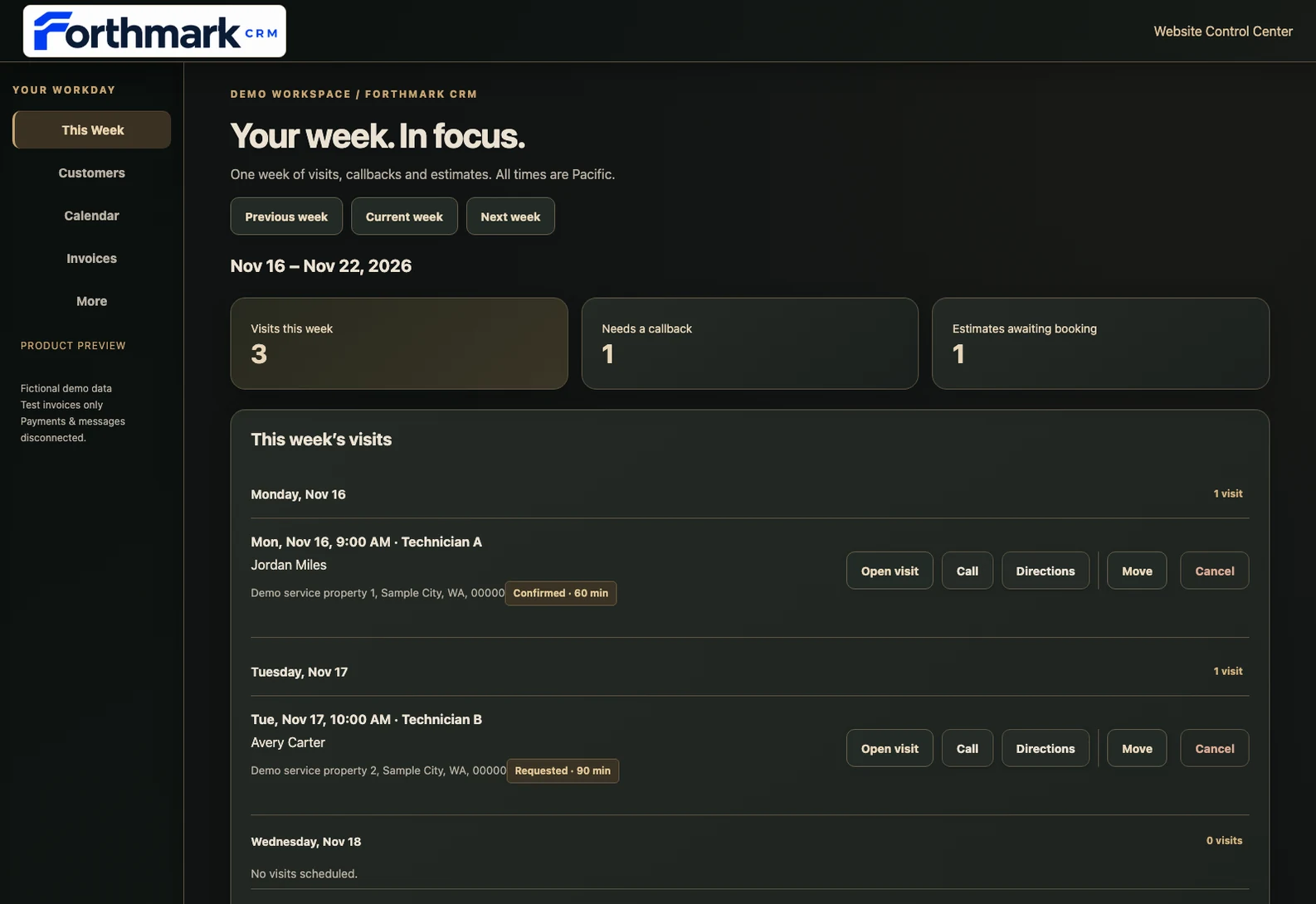
Explore the customer, calendar, and invoice views in the Forthmark CRM gallery.
Build estimates and invoices from the same details
A shared document builder connects estimates and invoices with the information behind the job: equipment and model details, service scope, editable line items, exclusions, warranty information, terms, and payment schedules.
Staff can add, remove, and reorder items, preserve estimate revisions, create a linked invoice, and produce a PDF. That keeps the document connected to the customer and the work instead of treating it as an isolated file.
Invoice preparation and payment collection are separate capabilities. The demonstrated payment history uses simulations; live payment processing and customer invoice sending require their own connection and verification.
Close the job with a useful record
Job closeout checklists and summaries preserve what was completed. Dated corrections and staff-attributed history make it easier to understand who changed a record and why.
Those records support the next visit as well as the current one. The customer, the original request, the estimate, and the finished work stay connected.
A workflow shaped around the business
Forthmark CRM is designed around connected work rather than a single trade. Home services and auto detailing may start with different questions; a consultation-led business may need a different pipeline or appointment process. The workflow and integrations are scoped around those needs.
The AirBros website project shows the wider approach: a public website for customers, a Control Center for content, and a practical workspace for the people running the business.
If your customer journey and daily work need to fit together more closely, explore Websites & Digital Tools or request a walkthrough. We can walk through your process and show where Forthmark CRM could make the next step clearer.